CitraSense
CitraSense automates satellite imaging for the Citra Space network. It runs as a daemon on your telescope computer, polls for observation tasks, controls your hardware, processes captured images, and uploads results — all unattended.
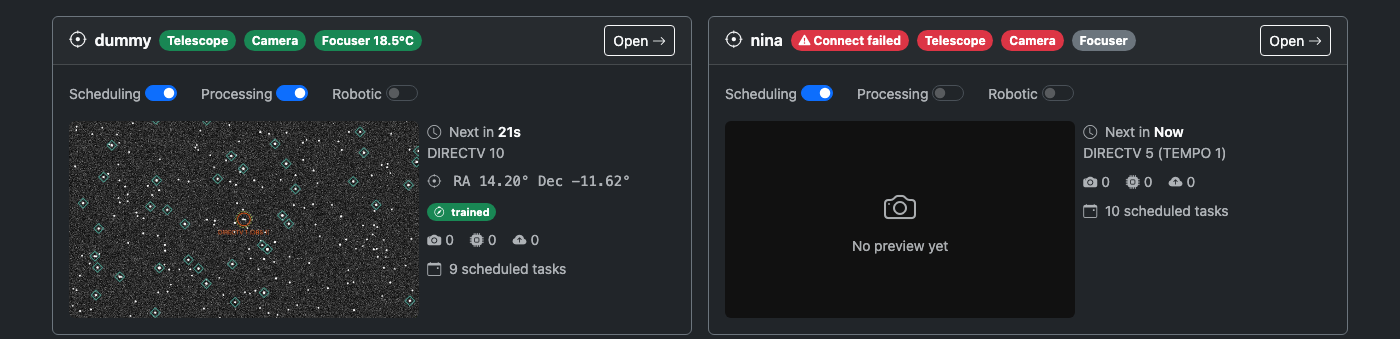
How It Works
- CitraSense polls the Citra Space API for assigned tasks
- Slews the telescope to the target and captures images
- Runs each image through the processing pipeline (calibration, plate solving, source extraction, photometry, satellite matching, annotated image)
- Uploads results to Citra Space
You control availability through the web dashboard — enable or disable scheduling, pause processing, or halt everything with the abort button.
Features
- Web dashboard — Monitor every sensor’s live status, task pipeline, and scheduled observations in real time. Configure every setting from your browser. Analyze past sessions to tune detection settings and reprocess stored images. Dark theme throughout to preserve night vision, and the layout adapts to phones and tablets for field use.
- Multi-sensor — Run multiple sensors from a single CitraSense host: optical telescopes, all-sky cameras, and staring cameras. Each sensor gets its own configuration, task queue, and hero card on the dashboard. Switch the active ground station from the UI without restarting the daemon.
- Hardware Adapters — Control telescopes through Direct Hardware (recommended — supports ZWO and Rainbow Astro mounts), N.I.N.A., KStars, or INDI.
- Processing Pipeline — Six-stage image pipeline: calibration, plate solving, source extraction, photometry, satellite matching, and annotated image generation.
- Robotic Operations — Per-telescope dusk-to-dawn sessions with start-of-night autofocus and pointing calibration. Tasks come from the Citra Space scheduler.
- Raspberry Pi — Flash an SD card, power on, connect to WiFi from your phone, and the dashboard is live. Pre-built image for headless field deployments.
Getting Started
Install CitraSense, launch it, and open the web dashboard:
uv tool install citrasense
citrasense
The dashboard opens at http://localhost:24872. From there, connect to the Citra Space API and select your hardware adapter. See Getting Started for details, or read Operating CitraSense for a walkthrough of a full session.